Connect to an OpenSearch Cluster
Product-specific getting started for dedicated OpenSearch stacks. For the canonical connection reference (endpoint, auth, ports, all API guides), see OpenSearch REST API — shared with Logs stacks.
If you have not yet created an OpenSearch Cluster, please see our guide on Creating an OpenSearch Cluster first.
Access Your Cluster Details
Once your OpenSearch Cluster has been created, find connection details in either place:
- Stack summary — endpoint, username, and password (click show to reveal the password)
- Settings → Endpoints — full API details including authentication mode, ports 443 / 9200, and example authenticated URLs (same layout as Logs stacks)
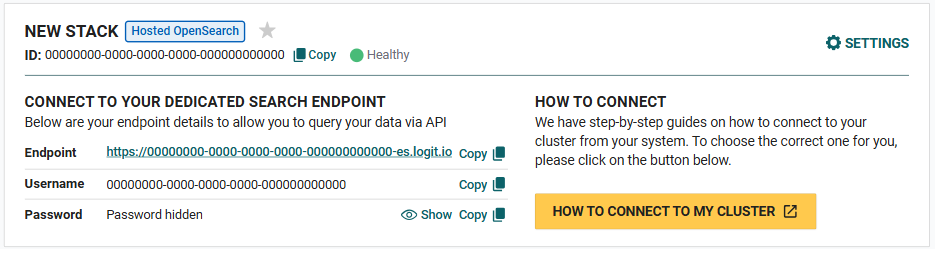
See Cluster Settings → Endpoints for the Endpoints page screenshot and copy buttons.
Connection Settings
Here are the settings you'll need to call the OpenSearch REST API on your cluster:
Endpoint:
@opensearch.endpointAddressUsername:
@opensearch.usernamePassword:
@opensearch.passwordThese credentials use Basic (username and password) authentication. Your stack may also use API key mode — switch on the Endpoints page if needed. See OpenSearch REST API for auth modes, API guides, and examples.
Advanced access: enable OpenSearch API (user credentials) for Teams role-scoped REST access on Business / Custom ({stack-id}-es-user.logit.io), or Hosted MCP quickstart for read-only Cursor / Claude on Log Management and Custom ({stack-id}-mcp.logit.io). Enable each applicable method independently under stack Settings → Access.
Cluster Settings
For more detailed information about your OpenSearch Cluster configuration, you can visit the OpenSearch Cluster Settings page.
Connect with Code Examples
We provide several examples showing how to connect to your OpenSearch Cluster using popular programming languages:
Next Steps
After connecting to your OpenSearch Cluster, you might want to:
- Browse OpenSearch REST API — search, bulk index, health checks, export to CSV
- Learn more about OpenSearch features and capabilities
- Explore advanced configuration options
- Browse all code examples for different integration scenarios